Business Objects - Event Actions
reviewed: 6 November 2025
A Simple Validation
Timingmust bepre- Check whether needs to fire on insert and / or Update (
type) - Raise exception of type
soft - Ensure to use
qualifier.invoke()when you use<@text>or<@mlText>
    if and(
        eq( [timing], eventActionTiming.Pre ),
        in( [type], eventActionType.Insert, eventActionType.Update ),
        // Your validation here
        // gt( bo.attr( [_me], 'startDate' ), bo.attr( [_me], 'endDate' ) )
    )
        raise exceptionType.soft, qualifier.invoke( <@mlText 'Start date must be before end date' > )
    end-if
Flagging Multiple Data Errors
Timingmust bepre- Check whether needs to fire on insert and / or Update (
type) - Raise exception of type
soft - Use
bo.addAttrError()orbo.addError()to add errors - Ensure to use
qualifier.invoke()when you use<@text>or<@mlText>
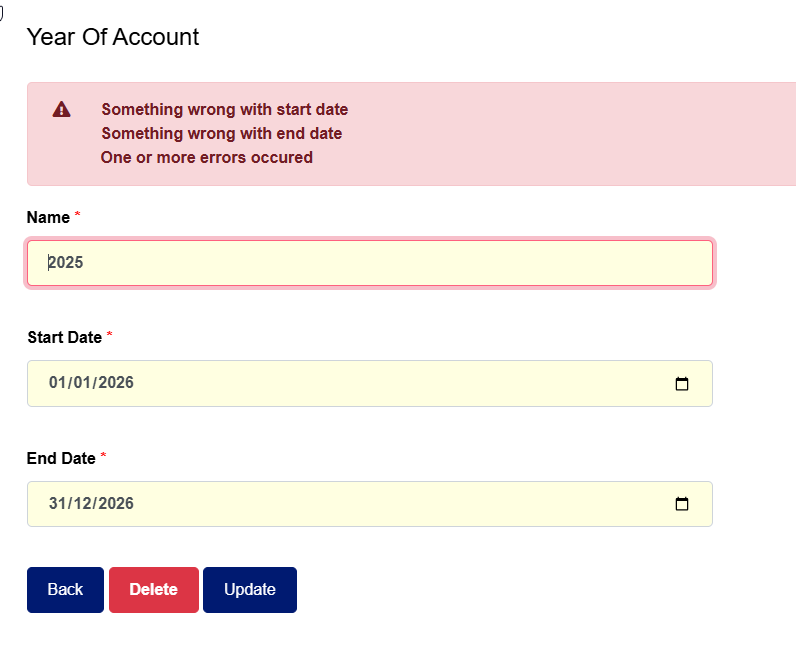
    if and(
        eq( [timing], eventActionTiming.Pre ),
        in( [type], eventActionType.Insert, eventActionType.Update )
    )
        if true() // Your validation goes here
            set( 'hasErrors', true() )
            bo.addAttrError( [_me], 'startDate', qualifier.invoke( <@mlText 'Something wrong with start date' > ) )
        end-if

        if true() // Your validation goes here
            set( 'hasErrors', true() )
            bo.addAttrError( [_me], 'endDate', qualifier.invoke( <@mlText 'Something wrong with end date' > ) )
        end-if

        if [hasErrors]
            // Option 1: with extra message
            raise exceptionType.soft, qualifier.invoke( <@mlText 'One or more errors occured' > )

            // Option 2: without extra message
            raise exceptionType.soft, null()
        end-if

    end-if
Note: (At time of writing, 6NOV25) the system should place the cursor on the first attribute with an error and / or visualize the field in error in some way. Will raise this for the CaseMaster® 2.0 roadmap.